Use KadoPool in Claude
Ask Claude about your pools in plain words, and get answers from your KadoPool account.
How to connect
In Claude on the web or in the desktop app.
Open your connectors
In Claude, open Settings, then Connectors.
Add KadoPool
Choose Add custom connector. Name it KadoPool, paste this address and add it:
https://kadopool.com/mcp
Connect and sign in
Choose Connect next to KadoPool. A KadoPool page opens on kadopool.com. Sign in as you do in the app: with Google, Apple or your e-mail. Claude never sees your password.
Signing in with your e-mail on a new browser? We first send you a code by e-mail.
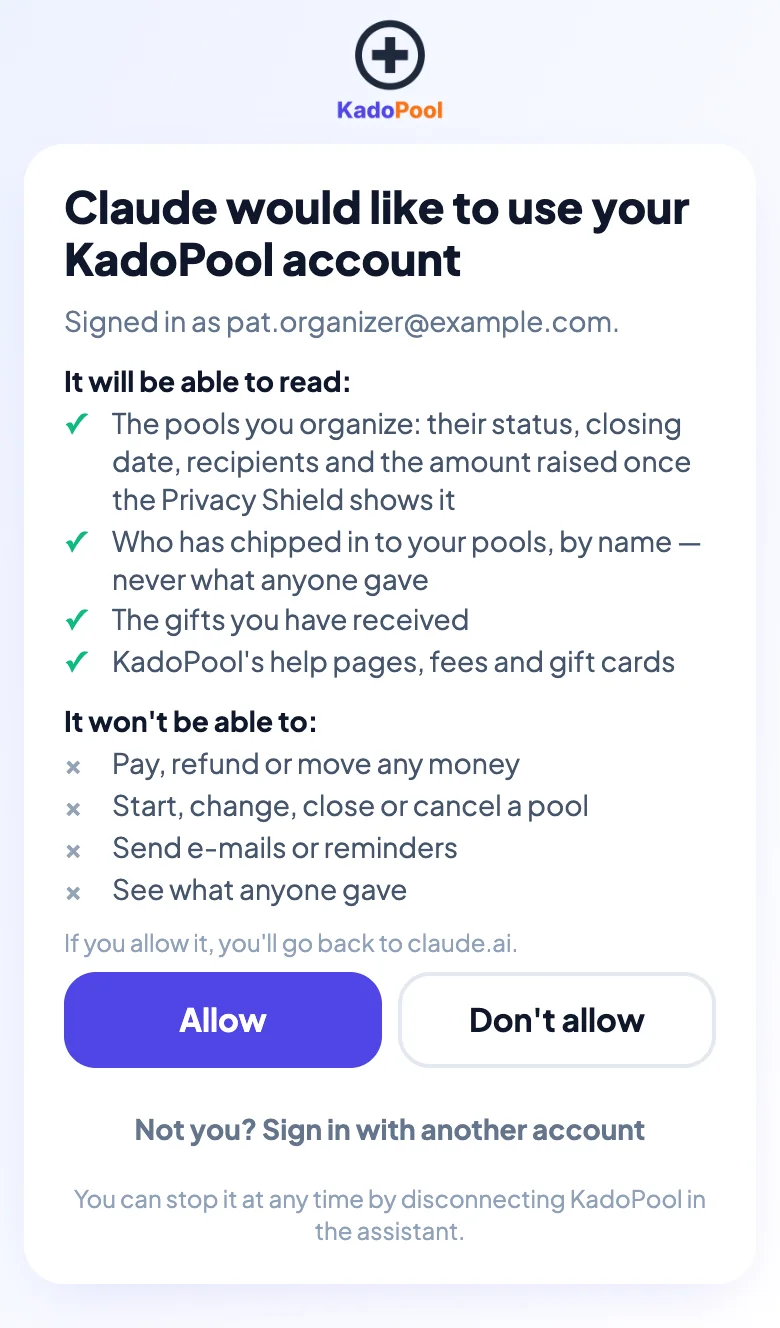
Choose Allow
The page shows what Claude will be able to read and what it won't. Choose Allow and you're back in Claude, ready to ask.
What you can ask
Ask the way you would ask a friend. A few examples:
-
Which of my pools are still open?
The pools you organize, their closing dates and how many people have paid.
-
Who has chipped in to my pool, and who hasn't yet?
Names, and whether each person has paid. Never what anyone gave.
-
Has the recipient claimed the gift yet?
Once you've sent the gift, whether each recipient has claimed it.
-
If 20 families give $25 each, what does the teacher receive?
The fees and what the recipient receives, as on the Pricing page.
-
Which gift cards can the recipient choose?
The current list, with the amounts and any card fee.
-
How do refunds work?
Answers from KadoPool's own pages, with a link to read more.
What Claude can and can't do
- It only reads. It can't pay, refund, start or change a pool, invite anyone, or send e-mails or reminders. You do those in the KadoPool app.
- It sees only what your account can see. The pools you organize, the gifts you have received, and KadoPool's public pages.
- Amounts stay private. Claude never sees what anyone gave. A pool's total stays hidden until enough people have given, as in the app.
- KadoBook messages stay private. Claude can't read them. As in the app, they are for their authors and the recipients only.
Privacy and disconnecting
- What Claude reads from KadoPool becomes part of your conversation in Claude.
- To disconnect, open Settings, then Connectors in Claude, and remove KadoPool.
- To disconnect Claude, remove the KadoPool connector in Claude's settings. Deleting your KadoPool account also ends its access. To use it again, connect again.
- Once your KadoPool account is deleted, Claude's access ends with it.
Other assistants
KadoPool's connector uses MCP, an open standard for connecting AI assistants to apps. So far, we have tested it with Claude only.
Questions?
Read the Help page, or ask our support chat: the round button at the bottom right of this page.
Go to Help